
When you start building Flutter apps seriously, one question eventually hits you:
“Should I use MVC or MVVM?”
At first, both look similar.
Both separate logic from UI.
Both promise cleaner code.
But in real production apps, the difference becomes very clear.
Let’s break this down properly — not academically — but practically.
🏗 Understanding MVC in Flutter
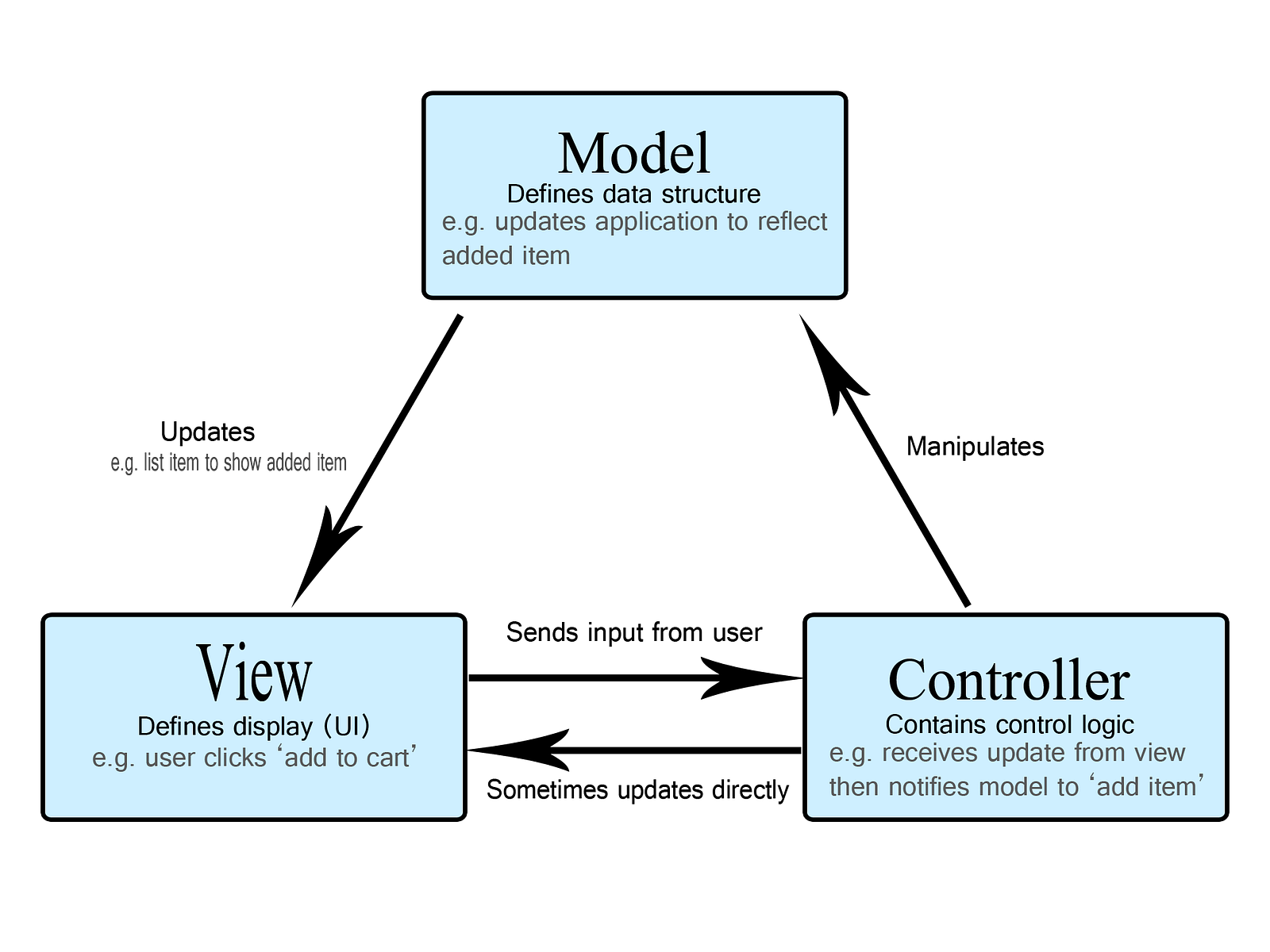
MVC = Model — View — Controller
Model → Data layer (API, database, models)
View → UI (Widgets)
Controller → Handles user input and business logic
How It Usually Looks in Flutter
User taps button
   ↓
Controller handles logic
   ↓
Model updates
   ↓
View rebuilds
Why Beginners Like MVC
- Easy to understand
- Simple structure
- Fast to implement
- Works well for small apps
The Problem in Flutter
Flutter is already reactive.
Your UI rebuilds based on state changes.
So when using MVC:
- Controllers often become very large
- UI and Controller start depending too much on each other
- Harder to scale when app grows
After 15–20 screens, controllers can become messy.
🧠 Understanding MVVM in Flutter

MVVM = Model — View — ViewModel
Model → Data & business rules
View → UI
ViewModel → Connects UI and Model using observable state
The key difference:
👉 The View does NOT talk directly to Model
👉 It talks to ViewModel
In Flutter Terms
- View → StatelessWidget / StatefulWidget
- ViewModel → ChangeNotifier / GetX Controller / Riverpod provider
- Model → API services, repositories
Flow:
User taps button
   ↓
ViewModel handles logic
   ↓
Model updates
   ↓
ViewModel notifies View
   ↓
UI rebuilds automatically
🔥 Why MVVM Feels More “Flutter-Native”
Flutter is reactive.
MVVM fits naturally because:
- State lives in ViewModel
- UI listens to changes
- Logic is separated cleanly
- Testing becomes easier
You don’t manually “tell the view to update.”
State change triggers rebuild automatically.
⚖️ MVC vs MVVM — Direct Comparison
Learning Curve
- MVC → Easy
- MVVM → Moderate
Best For
- MVC → Small apps
- MVVM → Medium & Large apps
Separation of Concerns
- MVC → Basic
- MVVM → Strong
Scalability
- MVC → Limited
- MVVM → High
Testability
- MVC → Harder
- MVVM → Easier
Flutter Compatibility
- MVC → Okay
- MVVM → Excellent
🧪 Real Production Example
In a simple login screen:
MVC Style
Controller:
- Validate input
- Call API
- Handle loading
- Handle errors
- Navigate
Controller becomes heavy.
MVVM Style
ViewModel:
- Holds loading state
- Holds error state
- Calls repository
- Notifies UI
UI only displays:
- loading spinner
- error message
- success state
Cleaner. More predictable.
🚨 When Should You Use MVC?
Use MVC if:
- You’re building a very small app
- It’s a prototype
- You’re learning architecture basics
- You’re working solo on small project
MVC is not wrong.
It’s just limited at scale.
🚀 When Should You Use MVVM?
Use MVVM if:
- App has 10+ screens
- You plan long-term scaling
- You want clean testing
- You work in a team
- You care about maintainability
For production Flutter apps, MVVM is usually the safer long-term choice.
💡 My Practical Advice
If you are serious about Flutter:
- Start simple
- Understand state management deeply
- Move toward MVVM structure
- Keep UI dumb
- Keep business logic outside widgets
The biggest mistake developers make is:
Mixing UI and logic too early.
Architecture decisions feel small in the beginning.
But they decide whether your app becomes clean — or chaotic.
🤔 Let Me Ask You
- Are your controllers getting bigger every week?
- Is your
build()method doing too much? - If another developer reads your project, will they understand it in 10 minutes?
If not — it may be time to rethink your architecture.