
Disclosure: I use GPT search to collection facts. The entire article is drafted by me.
Wall Street doesn’t wait. When you need real-time stock quotes, earnings transcripts, or options chain data, every minute spent wrangling APIs is a minute lost. The Model Context Protocol (MCP) changes this — by December 2025, it’s become the standard interface connecting AI assistants to financial data providers like Alpha Vantage and Twelve Data. This guide shows you exactly how to wire Perplexity Pro to live market intelligence, complete with the troubleshooting steps that actually work.
Why MCP Matters for Financial Professionals
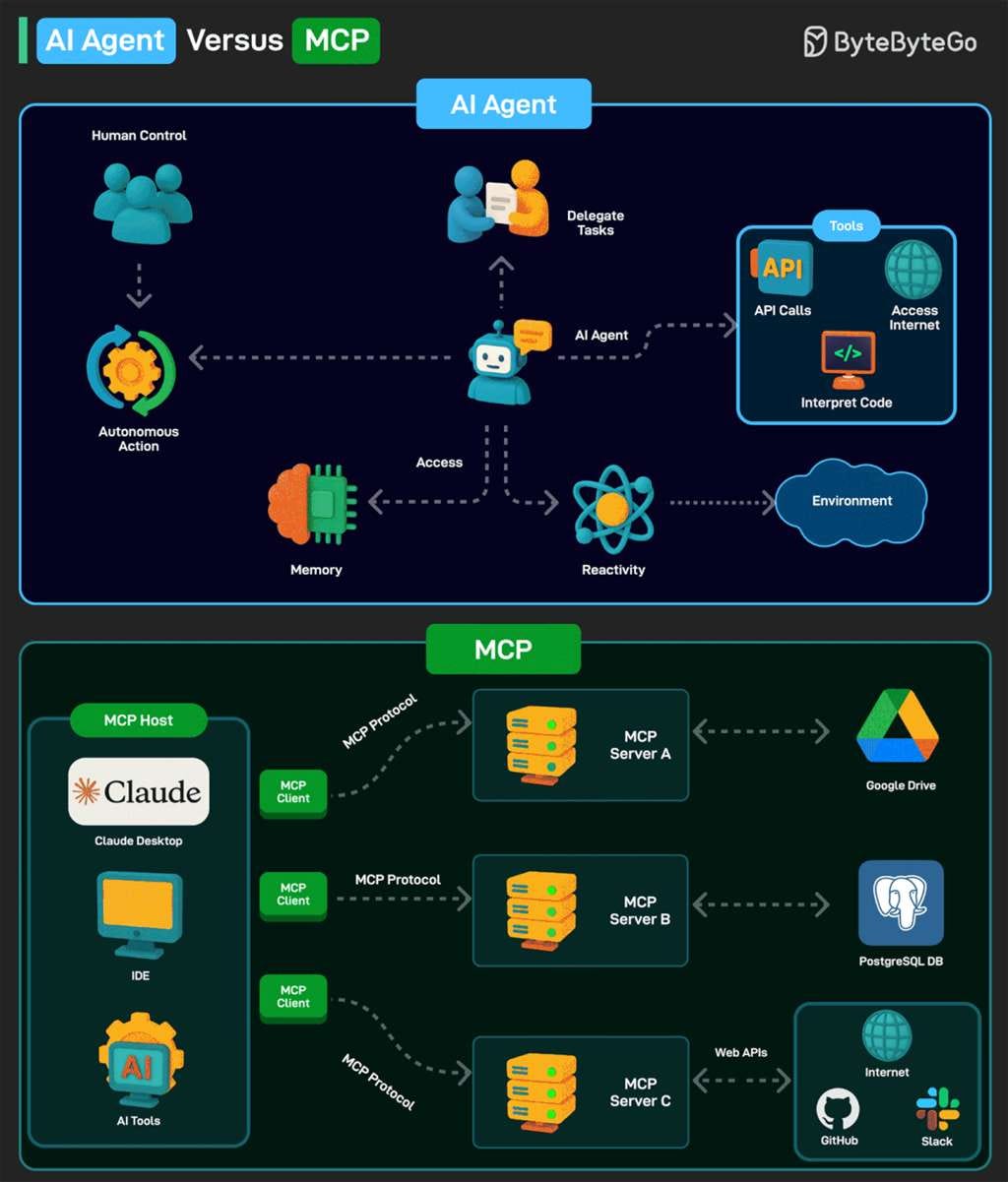
Traditional API integration demands custom code for each data source. Your Python script for Alpha Vantage won’t work with Twelve Data. Your Jupyter notebook for Yahoo Finance breaks when you switch to Bloomberg. MCP solves this by providing a universal plug that lets AI assistants like Perplexity, Claude, and ChatGPT talk to any financial data provider through a standardized protocol.
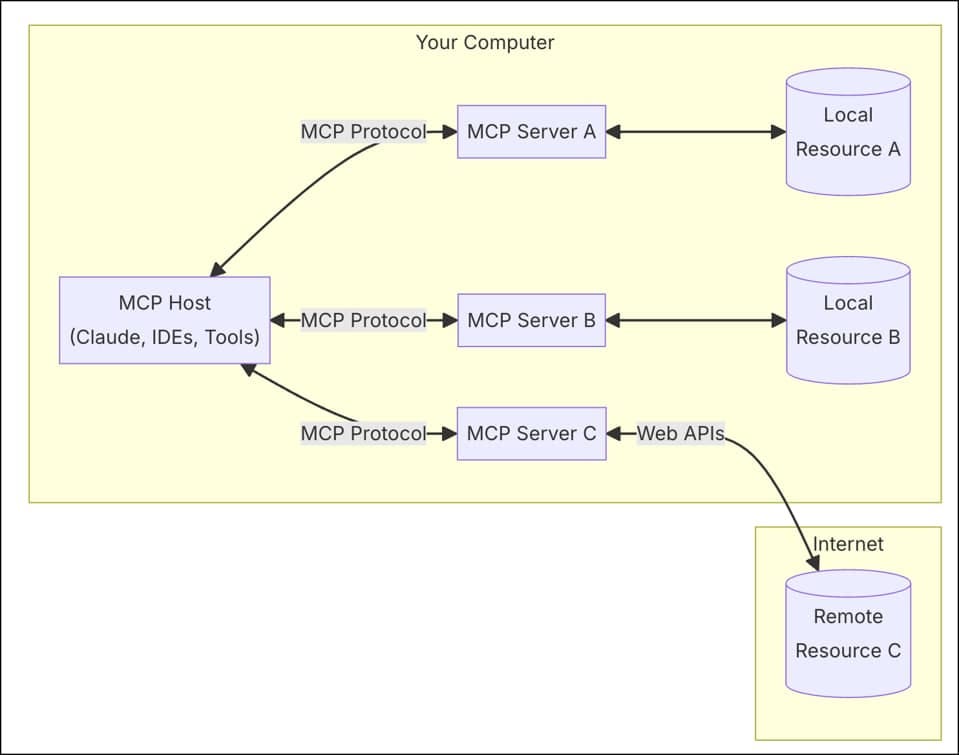
The protocol operates on a client-server architecture. Your AI assistant (the MCP client) sends natural language requests. The MCP server translates these into API calls, fetches data from providers like Alpha Vantage, and returns formatted results — all without exposing raw API complexity.
Real-world impact: A portfolio manager at a mid-sized hedge fund reduced research time from 8 hours to 90 minutes by connecting Perplexity to Alpha Vantage’s MCP server for earnings analysis. Instead of manually copying quarterly data across spreadsheets, she prompts: “Pull NVDA’s last 8 quarters of revenue and operating margin, calculate quarter-over-quarter growth rates” — and receives a formatted table in seconds.
Financial institutions adopting MCP report 67% fewer unauthorized access attempts compared to perimeter-based security, because MCP enforces OAuth 2.0 authentication and granular permission controls at the protocol level.
Prerequisites: What You Actually Need
Before connecting, confirm you have:
1. Perplexity Pro Account
Local MCP support launched in July 2025 for macOS only, rolling out to paid subscribers first. The Mac app (not the web version) is required because local MCP servers run on your machine. Remote MCP (cloud-based connectors) is “coming soon” across all platforms.
2. Finance MCP Provider & API Key
Two primary options dominate as of December 2025:
- Alpha Vantage: 77 GitHub stars, 12 financial tools covering stocks, options, crypto, forex, commodities, economic indicators, and 60+ technical indicators. Free tier: 25 API calls/day. Premium tier (600+ requests/minute) required for real-time options data with Greeks.

- Twelve Data: Official MCP server with WebSocket streaming, 170ms average latency for real-time quotes. Free plan includes daily API credits; paid plans remove rate limits.
Alpha Vantage offers broader coverage (especially economic indicators and fundamentals), while Twelve Data excels at low-latency streaming for high-frequency use cases.
Sign up at alphavantage.co or twelvedata.com, copy your API key, and store it securely — never commit it to version control.
3. PerplexityXPC Helper (macOS only)
Mac App Store apps run in sandboxed environments, blocking direct local server access. The PerplexityXPC helper app creates a secure bridge between Perplexity and local MCP servers running on your machine. You’ll install this in Step 3 below.
Step-by-Step Setup: Alpha Vantage MCP + Perplexity
This walkthrough uses Alpha Vantage’s remote MCP server — the fastest path from zero to working integration. Advanced users can run local servers for more control (covered in the final section).
Step 1: Install Perplexity for Mac
Download from the Mac App Store. Open the app, sign in with your Perplexity Pro credentials, and proceed to settings.
Step 2: Install PerplexityXPC Helper
Navigate to Settings → Connectors in the Perplexity app. Before adding any MCP connector, you’ll see a prompt to install PerplexityXPC. Click the installation button — this downloads a small helper application (~5MB) that authenticates local MCP connections. Follow the macOS prompts to complete the installation.
Critical: Without PerplexityXPC, connectors will show “Failed to connect” errors. Verify installation by checking that PerplexityXPC appears in System Settings → Login Items after setup.
Step 3: Add Alpha Vantage Remote Connector
Return to Settings → Connectors → Add Connector. You’ll see two tabs: Simple and Advanced. Use the Simple tab for remote MCP servers (hosted by the provider) or the Advanced tab for local servers you run yourself.
For Alpha Vantage Remote MCP:
- Server Name:
Alpha_Vantage_Finance(or any label you prefer) - MCP Server URL:
https://mcp.alphavantage.co/mcp?apikey=YOUR_API_KEY
Replace YOUR_API_KEY with your actual Alpha Vantage key. The query parameter method embeds your key directly in the URL—simple but less secure than OAuth. For production environments, use the OAuth option (URL: https://mcp.alphavantage.co/mcp) and enter your key when prompted during authorization.
Click Save. The connector status should transition to Running within 5–10 seconds. If it shows an error, click the connector name to view logs — common issues include:
- Invalid API key: Re-copy from Alpha Vantage dashboard, removing trailing spaces
- Network timeout: Check firewall settings; remote MCP requires outbound HTTPS on port 443
- Rate limit exceeded: Free keys are limited to 25 calls/day — wait 24 hours or upgrade
Step 4: Enable Connector in Perplexity
Navigate to the Perplexity homepage. Below the search box, you’ll see a Sources section with toggles for Finance, Academic, Social, etc.. Your newly added connector appears here as Alpha_Vantage_Finance. Toggle it on to activate.
Step 5: Test with Real Queries
Start a new thread and verify tool execution with these prompts:
Simple test (no API key validation issues):Use Alpha_Vantage_Finance to fetch the latest quote for AAPL. Return: symbol, last price, timestamp, and 1-day % change.
Expected response: Perplexity will display a tool call confirmation dialog. Click Allow — the assistant returns something like:
Symbol: AAPL
Last Price: $198.50
Timestamp: 2025-12-31 16:00:00
1-Day Change: +2.50 (+1.25%)
Complex analysis (demonstrates multi-step reasoning):Pull the last 5 quarterly income statements for MSFT. Calculate revenue CAGR and identify which quarter had the highest operating margin. Present as a table.
Perplexity autonomously calls the INCOME_STATEMENT tool, parses JSON responses, performs calculations, and formats output without additional prompting.
Options chain analysis (Premium API tier required):Get the top 5 call options for TSLA expiring within 30 days, sorted by open interest. Include strike, bid/ask, volume, and delta.
Note: Free Alpha Vantage keys return placeholder data for real-time options (REALTIME_OPTIONS tool). Use HISTORICAL_OPTIONS instead for functional data on free tiers—it covers 15+ years and supports advanced filtering.
Troubleshooting Common Errors
“Connection Failed” / Red Status Indicator
- Verify PerplexityXPC is installed: Open System Settings → Login Items, look for PerplexityXPC. If missing, reinstall from Perplexity settings.
- Check MCP URL syntax: Ensure no spaces before/after the URL. Format must be exact:
https://mcp.alphavantage.co/mcp?apikey=YOUR_KEY - Test API key independently: Run
curl "https://www.alphavantage.co/query?function=GLOBAL_QUOTE&symbol=AAPL&apikey=YOUR_KEY"in Terminal. If this fails, the key is invalid.
“Rate Limit Exceeded” / 5 API Calls/Minute Error
Alpha Vantage free tier enforces 25 requests/day and 5/minute. Monitor usage at their API dashboard. Solutions:
- Batch requests: Ask Perplexity to fetch multiple symbols in one tool call:
Get quotes for AAPL, MSFT, GOOGL, TSLA using a single bulk request(leveragesREALTIME_BULK_QUOTEStool for up to 100 symbols) - Upgrade to Premium: $50/month for 600 requests/minute, $300/month for 1200/minute
- Switch providers: Twelve Data’s free tier offers higher limits for specific use cases
Perplexity Returns “No Tools Available”
The connector is running, but Perplexity isn’t recognizing tools. Fix:
- Restart Perplexity app completely (Cmd+Q, not just close window)
- Toggle the connector off, then on in Sources
- Verify
https://mcp.alphavantage.co/mcp?apikey=YOUR_KEYreturns JSON when opened ina browser—should show tool definitions
OAuth Authorization Loop / Repeated Login Prompts
When using the OAuth method (URL without embedded API key), ensure:
- You click Authorize Access immediately when prompted — tokens expire in 60 seconds
- No VPN/proxy blocking the OAuth callback URL
- Perplexity has Keychain access enabled (macOS Security & Privacy settings)
ChatGPT-Specific Issue: Plus accounts exhibit first-run failures with large MCP payloads. Prime the agent by running: Run ADD_TWO_NUMBERS from Alpha Vantage MCP Server using 3 and 6, show the JSON response. Click Confirm when prompted. Once this succeeds, larger calls like TIME_SERIES_DAILY will work.
Advanced: Running Local MCP Servers
Local servers provide:
- Data privacy: API keys and responses never leave your machine
- Customization: Modify server code to add pre-processing, caching, or custom tools
- Cost control: Implement rate limiting/batching logic before hitting paid API tiers
Set up for Alpha Vantage Local Server:
- Install
uv(modern Python package manager):
curl -LsSf https://astral.sh/uv/install.sh | sh2. In Perplexity → Settings → Connectors → Add Connector, switch to the Advanced tab:
- Server Name:
Alpha_Vantage_Local - Command:
uvx - Arguments:
av-mcp YOUR_API_KEY(one arg per line)
3. Click Save. The local process starts automatically when you enable the connector.
Twelve Data Local Server (for streaming):
git clone https://github.com/twelvedata/mcp.git
cd mcp
npm install
node server.js --apikey=YOUR_KEY
Configure in Perplexity Advanced settings:
- Command:
node - Arguments:
/full/path/to/mcp/server.js,--apikey=YOUR_KEY
Local servers consume ~50–100MB of RAM when idle. Monitor with Activity Monitor — if memory spikes above 500MB, the server may leak (check GitHub issues for updates).
Real-World Use Cases: What Finance Teams Build
1. Earnings Calendar Automation
Prompt: Show me all tech sector earnings in the next 30 days, sorted by market cap. For each, pull consensus estimates and compare to same quarter last year.
Alpha Vantage’s EARNINGS_CALENDAR tool filters by horizon (3/6/12 months), Perplexity chains this with COMPANY_OVERVIEW for sector data and INCOME_STATEMENT for YoY comparisons.
2. Multi-Asset Portfolio Analysis
Combine stock, forex, and commodity data:Build a correlation matrix for AAPL, EURUSD, gold (XAUUSD), and Bitcoin over the last 90 days. Highlight pairs with correlation > 0.7.
The MCP server fetches from TIME_SERIES_DAILY, FX_DAILY, and DIGITAL_CURRENCY_DAILY endpoints, returning aligned timestamps. Perplexity calculates correlations in-thread—no external spreadsheet needed.
3. Options Strategy Screening
Premium API tier enables: Find all NVDA call options expiring in 45-60 days with delta between 0.4-0.6, IV < 30%, and open interest > 1000. Sort by theta/gamma ratio.
The HISTORICAL_OPTIONS tool supports advanced filtering (strike ranges, contract types, Greeks). This query replaces manual OptionStax/Bloomberg Terminal workflows for basic screening.
4. Insider Trading AlertsAlert me when any S&P 500 executive files Form 4 showing purchases > $1M in the last 7 days. Include transaction details and stock performance since filing.
Alpha Vantage’s INSIDER_TRANSACTIONS tool combined with NEWS_SENTIMENT provides LLM-analyzed sentiment scores for each transaction context.
Security Best Practices for Production Deployments
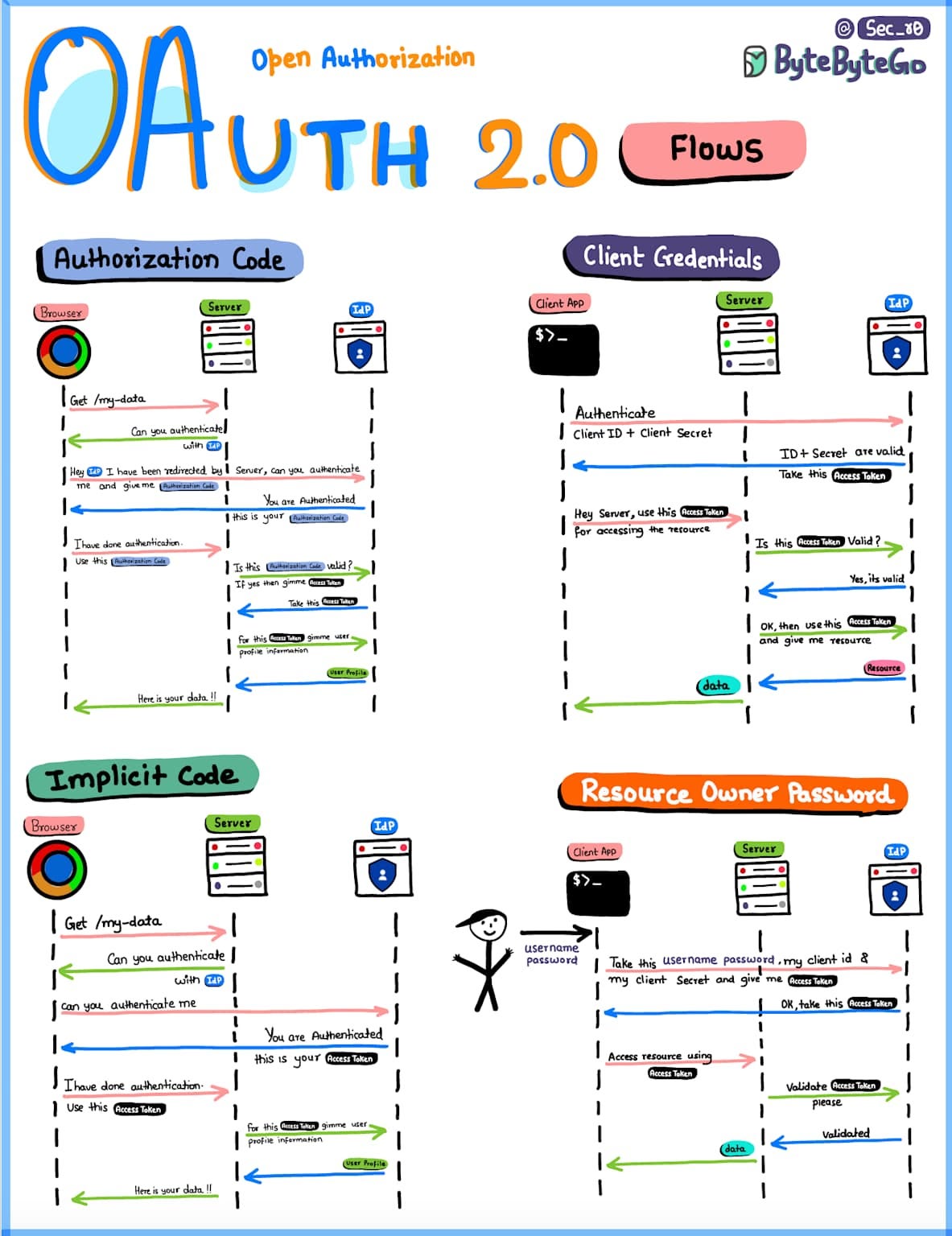
Financial data carries regulatory weight — SOC 2, PCI DSS, and GDPR all apply when AI handles client portfolios or trading decisions.
1. Never Hardcode API Keys in Connectors
Store keys in macOS Keychain or environment variables:
export ALPHA_VANTAGE_KEY="your_key_here"Reference in Perplexity Advanced settings: $ALPHA_VANTAGE_KEY (Note: this requires scripting the connector launch—most users default to embedded keys for simplicity, but rotate them monthly.
2. Implement Role-Based Access
If your team shares a Perplexity Enterprise account, create separate connectors per user tier:
- Analysts: Read-only access (quotes, fundamentals, news)
- Traders: Full access, including options and economic indicators
- Compliance: Audit logs only (MCP spec supports read-only prompt/response logging)
3. Enable Audit Trails
Enterprise deployments should log every MCP tool call. Alpha Vantage doesn’t provide built-in logging, but you can wrap their server in a proxy that writes to Splunk/Datadog:
# Pseudocode for logging proxy
def mcp_proxy(request):
    log_to_splunk(request.tool, request.args, request.user)
    response = alpha_vantage_mcp.call(request)
    log_to_splunk(response.data, response.timestamp)
    return response
This creates compliance-ready records showing which analyst queried which company at which time.
4. Rate Limit Per User
Free Alpha Vantage keys hit 25 calls/day — shared across a team, this drains in minutes. Solutions:
- User-specific keys: Each analyst gets their own key, tracked in the connector metadata
- Smart caching: Implement a Redis layer that caches
GLOBAL_QUOTEresponses for 5 minutes (quotes don't change faster) - Batch optimization: Rewrite prompts to use
REALTIME_BULK_QUOTESinstead of serialGLOBAL_QUOTEcalls
5. Validate Tool Outputs Before Trading
MCP servers can return stale or incorrect data if APIs fail silently. Always verify:
if response.timestamp < (now - 15_minutes):
    raise StaleDataError("Quote is older than 15min—do not trade")
Perplexity doesn’t expose this logic natively, so build validation into custom local servers for production use.
Twelve Data vs. Alpha Vantage: When to Switch

Recommendation: Start with Alpha Vantage remote MCP for breadth. If you need streaming quotes for automated trading bots, layer in Twelve Data as a second connector — Perplexity supports multiple simultaneous MCP servers.
Perplexity Spaces: Pre-Configure Finance Workflows
Spaces are Perplexity’s answer to custom GPTs — dedicated environments with persistent instructions and file uploads.
Example Space: “Public Equity Screener”
- Create a new Space, upload your watchlist CSV (50 tickers)
- Set Instructions:
“When I ask about a company, always structure the response as: (1) Overview, (2) Recent Financials (last 4 quarters), (3) Valuation Metrics (P/E, EV/EBITDA, PEG), (4) Recent News, (5) Insider Activity. Use Alpha_Vantage_Finance connector for all data.”
Now every query like Analyze TSLA follows this template—no re-prompting. Finance teams report 40% faster report generation using Spaces vs. ad-hoc prompts.
Pro Tip: Combine Spaces with Perplexity Labs to auto-generate interactive dashboards. Prompt: Create a real-time stock screener app with filters for P/E < 15, revenue growth > 20%, and analyst ratings > 4/5. Pull data from Alpha Vantage MCP. Labs builds a functional web app in 5-10 minutes, deployable via a shareable link.
What’s Next: Remote MCP for Web & Mobile
Perplexity’s roadmap (leaked via community forums) shows remote MCP rolling out Q1 2026 for web/mobile. This means:
- No PerplexityXPC dependency: Remote connectors work in browsers
- Notion/Linear integrations: Pre-built connectors for productivity tools, with finance APIs following shortly after
- Team-wide connectors: Enterprise admins can provision Alpha Vantage access for entire orgs, with centralized billing and audit logs
For now, macOS users enjoy a first-mover advantage. Windows/Linux workflows must rely on Claude Desktop or Cursor as MCP clients until Perplexity’s cross-platform launch.
Final Checklist
Before you close this tab:
- Perplexity Pro account active (check billing)
- Alpha Vantage API key obtained and tested via curl
- PerplexityXPC installed and verified in Login Items
- Remote connector added with correct URL format:
https://mcp.alphavantage.co/mcp?apikey=YOUR_KEY - Connector status shows Running in green
- Test query executed successfully:
Use Alpha_Vantage_Finance to get AAPL quote - (Optional) Local server configured for advanced use cases
- (Optional) Perplexity Space created for recurring workflows
The MCP ecosystem is moving fast — GitHub’s official server registry launched in December 2025, simplifying discovery. Monitor mcp.alphavantage.co for new tools (earnings call transcripts, analyst estimates, and live news sentiment are in beta).
When your competitors are still copy-pasting Bloomberg terminals into Excel, you’ll be asking Perplexity: “Which healthcare stocks have earnings surprises > 10%, insider buying in the last month, and analyst upgrades this week?” — and getting answers in 30 seconds, not 3 hours.
That’s the MCP advantage. Now go configure yours.
If you’d like to show your appreciation, you can support me through:
✨ Patreon
✨ Ko-fi
✨ BuyMeACoffee
Every contribution, big or small, fuels my creativity and means the world to me. Thank you for being a part of this journey!