
Stop Googling. Start shipping.
Frontend development often feels like it’s more about wrangling data into the right format than actually writing application logic.
Convert this JSON to TypeScript types. Decode that JWT from the auth response. Format this API payload so you can actually read it. Generate a UUID for that test. Check if this regex matches what you think it matches.
🚀 Crack FAANG Interviews in 90 Days!
Prep smarter, not longer. Real coding challenges, mock interviews, and expert guidance — all in one place.
🔥 Get Unlimited Access

Sound familiar?
I’ve been keeping track of the tools I reach for most often during frontend work. Here’s what I’ve found useful from The Dev Suite — all running locally in your browser, no data sent anywhere.
The Data Wrangling Essentials
The JSON Formatter is probably the tool I use most. API responses arrive as a single unreadable line, and you need to actually see the structure. Paste JSON, get formatted output with syntax highlighting. The formatter validates as it formats, so if your JSON is malformed, you’ll know exactly where the problem is.
Pro tip: When debugging API responses, use the “sort keys” option. This makes it easier to compare two responses side-by-side since keys appear in the same order.
The JWT Decoder comes in second. When auth isn’t working and you need to inspect the token, paste the JWT and see the header, payload, and signature decoded. Check expiration status at a glance. See the algorithm used, all claims, and human-readable timestamps. Essential for debugging OAuth flows, session issues, and permission problems.
Common JWT debugging scenarios:
- Token expired? Check the
expclaim against current time - Wrong permissions? Look for
scope,roles, or custom claims - Wrong user? Verify
suboruser_idclaims - Algorithm mismatch? Header shows
alg— make sure your backend expects it
JSON to TypeScript conversion saves hours of manual type definition. Paste your JSON response, get TypeScript interfaces instantly. Handles nested objects, arrays, and optional fields.
Workflow tip: When integrating a new API, paste a sample response into the converter, then refine the generated types. It’s faster than writing from scratch and catches nested structures you might miss.
Color conversion is surprisingly frequent. The designer gives you HSL, the codebase uses HEX, and the component library wants RGB. Enter any color format, get all the others, with a visual preview. Copy any format with one click.
Time and Identity
Timestamp conversion is one of those things you don’t think about until you need it. The API returns 1703980800 and you need to know what date that is. Paste a Unix timestamp, get human-readable date/time. Or enter a date and get the timestamp. Handles both seconds and milliseconds, so you never have to wonder which format you're dealing with.
UUID generation is constant during development. You need unique IDs for test data, mock objects, or temporary keys. Generate cryptographically secure v4 UUIDs with one click. Generate multiple at once. Copy to clipboard instantly.
Encoding and Patterns
Base64 encoding and decoding comes up more than you’d expect. Decoding JWT parts manually, creating data URIs for small images, debugging encoded API payloads, working with Basic Auth headers. Encode text to Base64, decode Base64 to text. Also handles file uploads for binary data.
URL encoding handles the constant need to encode query parameters or decode URLs that have been double-encoded. Essential for debugging OAuth callback URLs and fixing redirect issues.
URL encoding gotchas to watch for:
- Double-encoding:
%2520instead of%20(space encoded twice) - Plus vs %20: Some systems use
+for space, others use%20 - Reserved characters:
&,=,?need encoding in parameter values - Path vs query encoding: Different rules apply
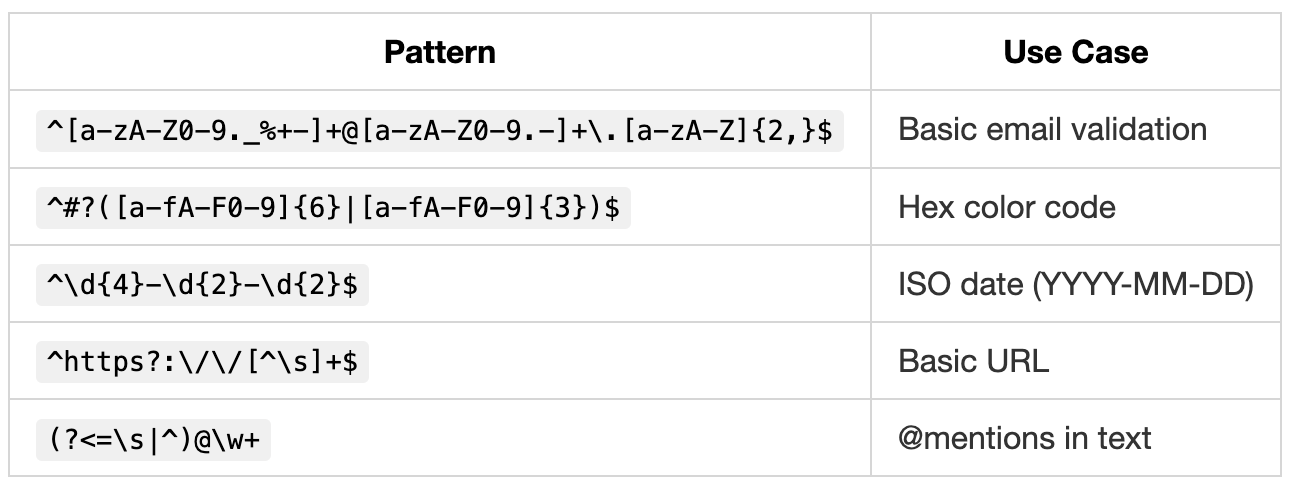
The Regex Tester saves hours of frustration. Your regex works in the console but not in production. Or vice versa. Test patterns against sample text with live highlighting. See all matches, capture groups, and match indices in real-time. Debug regex visually instead of console.log-ing your way to madness.
Regex patterns every frontend dev should know:
Format Conversion
Case conversion handles the constant translation between naming conventions. The API uses snake_case, your code uses camelCase, and CSS wants kebab-case. Convert between any case format instantly — camelCase, PascalCase, snake_case, kebab-case, CONSTANT_CASE, Title Case, Sentence case. Paste a variable name, get it in every format.
YAML to JSON conversion (and back) handles the constant format switching between config files. Your config is in YAML but you need JSON, or vice versa. Bidirectional conversion that preserves structure and types.
CSV to JSON conversion handles data transformation. You have spreadsheet data that needs to be JSON, or JSON that needs to go into a spreadsheet. Convert between formats with custom delimiter support.
Content and Comparison
The Markdown Preview lets you write README content and see how it’ll render without pushing to GitHub. Write Markdown on the left, see GitHub-flavored preview on the right. Live updates as you type.
The Text Diff tool finds what changed between two versions. Paste two texts, see the differences highlighted. Unified or side-by-side view. Perfect for comparing API responses, finding config changes, and debugging “it worked before” situations.
Lorem Ipsum generation is better than typing “asdf” everywhere when you need placeholder text for a component. Generate Lorem Ipsum by paragraphs, sentences, or words. More professional than “test test test.”
QR Code generation handles the need to quickly create QR codes for testing mobile flows or sharing URLs.
The Workflow
Here’s how these tools fit into a typical frontend debugging session. API returns weird data — JSON Formatter to read it. Auth not working — JWT Decoder to inspect token. Token looks fine, check expiry — Timestamp Converter. Need to match a pattern — Regex Tester. Generate test data — UUID Generator plus Lorem Ipsum.
All in one tab. No context switching. No hunting for tools.
What’s Inside
The Dev Suite includes 50+ tools across seven categories — formatters, encoders, converters, generators, parsers, analyzers, and validators. Beyond what I’ve mentioned, there are tools for SQL formatting, HTML entity encoding, hash generation, cron parsing, JSONPath evaluation, email validation, and much more.
The tool set covers the utilities developers use most often, all running client-side with no data transmission.
thedevsuite.com — Bookmark it, pin it, make it your new tab page. Press ⌘K / Ctrl+K to find any tool instantly.
All tools run locally in your browser. Your code and data never leave your machine.
References
- MDN Web Docs. “Regular Expressions.” Mozilla Developer Network, 2024. https://developer.mozilla.org/en-US/docs/Web/JavaScript/Guide/Regular_Expressions
- RFC 4122. “A Universally Unique IDentifier (UUID) URN Namespace.” IETF, 2005. https://www.rfc-editor.org/rfc/rfc4122
- RFC 7519. “JSON Web Token (JWT).” IETF, 2015. https://www.rfc-editor.org/rfc/rfc7519
Writer : Swaraj Verma
— Bhuwan Chettri
Editor, CodeToDeploy
CodeToDeploy Is a Tech-Focused Publication Helping Students, Professionals, And Creators Stay Ahead with AI, Coding, Cloud, Digital Tools, And Career Growth Insights.