

“If your React app is re-rendering forever, chances are… your dependency array is lying to you.” 😅
We’ve all been there:
You add a simple useEffect, refresh the page… and boom — infinite re-renders, API calls going brrr, laptop fan sounding like a jet engine. ✈️
Let’s break down 5 common myths about useEffect dependencies that silently cause performance issues and bugs — and how to fix them properly.
🚀 Crack FAANG Interviews in 90 Days!
Prep smarter, not longer. Real coding challenges, mock interviews, and expert guidance — all in one place.
🔥 Get Unlimited Access
❌ Myth 1: “Empty dependency array means it runs once forever”
useEffect(() => {
  fetchData();
}, []);
🚨 Problem
This only runs once per component mount, not forever.
If props/state used inside fetchData change later, your effect becomes stale.
✅ Better
useEffect(() => {
  fetchData(userId);
}, [userId]);
📌 Rule:
If you use a variable inside useEffect, it belongs in dependencies.
❌ Myth 2: “Functions don’t need to be added as dependencies”
useEffect(() => {
  loadData();
}, []);
🚨 Problem
Functions are re-created on every render.
React sees a new reference → effect can behave unpredictably.
✅ Fix with useCallback
const loadData = useCallback(() => {
  console.log("Fetching...");
}, []);
useEffect(() => {
loadData();
}, [loadData]);📌 Rule:
Functions are dependencies too.
❌ Myth 3: “Objects and arrays are safe in dependency arrays”
useEffect(() => {
  console.log(filters);
}, [filters]);
🚨 Problem
Even if filters content is same, its reference changes → infinite re-renders.
✅ Fix with memoization
const filters = useMemo(() => ({ status: "active" }), []);useEffect(() => {
console.log(filters);
}, [filters]);📌 Rule:
Objects & arrays change reference easily → memoize them.
❌ Myth 4: “If it causes loops, just remove it from dependencies”
useEffect(() => {
  setCount(count + 1);
}, []);
🚨 Problem
This creates stale state bugs.
✅ Correct approach
useEffect(() => {
  setCount((prev) => prev + 1);
}, []);
📌 Rule:
Never hide dependency bugs by deleting dependencies.
❌ Myth 5: “ESLint rules are optional warnings”
React’s ESLint rule:
react-hooks/exhaustive-deps🚨 Problem
Ignoring this rule leads to:
- Stale closures
- Hidden bugs
- Unexpected behavior in production
✅ Best practice
Fix the code, don’t silence the warning.
useEffect(() => {
  fetchUser(userId);
}, [userId]);
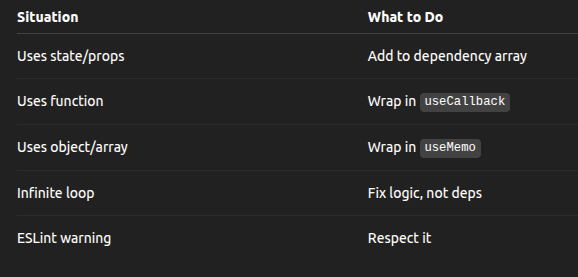
🧠 Quick Mental Model
⚡ Real-World Infinite Loop Example
❌ Bad:
useEffect(() => {
  setUser({ name: "Dev" });
}, [user]);
✅ Good:
useEffect(() => {
  setUser((prev) => ({ ...prev, name: "Dev" }));
}, []);
🧩 TL;DR
useEffectre-runs when dependencies change- Functions & objects change references
- ESLint warnings exist for a reason
- Infinite loops = logic problem, not React problem
📌 Final Thought
Most infinite re-renders are not React bugs —
they’re dependency misunderstandings.
Once you master useEffect dependencies, your apps become:
- Faster ⚡
- Cleaner 🧹
- Easier to debug 🧠
Writer : Akiko Kawai
— Bhuwan Chettri
Editor, CodeToDeploy
CodeToDeploy Is a Tech-Focused Publication Helping Students, Professionals, And Creators Stay Ahead with AI, Coding, Cloud, Digital Tools, And Career Growth Insights.